
When was the last time your development team proposed a major software modernization project?
If it feels like you’re always either planning one, executing one, or recovering from one, the true problem may lie in your approach to modernization.
Most organizations discover their technical debt only after it’s metastasized: when security vulnerabilities force urgent patches, when critical dependencies reach end-of-life, or when talented developers refuse to work on outdated tech stacks. By then, what started as deferred maintenance has ballooned into a protracted six-figure overhaul.
Is adopting a Continuous Modernization (CM) approach the only surefire way to prevent an avalanche of technical debt?
What is Continuous Modernization?
Continuous Modernization is a proactive software maintenance strategy that systematically updates your proprietary applications, APIs, and internal software components as part of your regular development workflow. Rather than allowing dependencies to age until they require massive overhaul projects, CM integrates incremental updates directly into your existing DevOps processes.
Continuous Modernization is a natural extension of CI/CD practices. Just as Continuous Integration and Continuous Deployment automate testing and releases, Continuous Modernization automates the process of keeping your technology stack current with the latest versions of databases, frameworks, SDKs, and third-party libraries.
The hidden cost of deferred updates
Here’s a scenario that plays out repeatedly across enterprise IT departments: an application launches successfully with modern dependencies. Development teams move on to new projects. Months pass, then years. Meanwhile, that once-current application quietly falls behind. What begins as a minor version lag – perhaps staying on an older database driver or postponing a framework update – compounds over time. Before long, your “stable” application is running on unsupported software versions with known security vulnerabilities and compatibility issues.
When the gap becomes too wide to ignore, you’re forced to launch a major modernization initiative. Development resources that should be building revenue-generating features instead get redirected to upgrade work that delivers no visible value to stakeholders. The maintenance burden that was once manageable has transformed into an expensive, high-risk project.
McKinsey finds that technical debt accounts for roughly 40% of IT balance sheets – and adds 10-20% to the costs of any given IT project.
How Continuous Modernization prevents tech debt accumulation
Continuous Modernization flips this reactive approach on its head. Instead of waiting until upgrades become emergencies, organizations establish automated pipelines that handle updates incrementally and continuously.
The process works by running parallel upgrade tracks alongside your standard development workflow. When new versions of dependencies become available, they’re automatically tested against your codebase in isolated environments. Issues are identified early when they’re still small and manageable, rather than discovering compatibility problems years later when dozens of dependencies demand simultaneous updates.
This approach delivers several key advantages:
Smaller, manageable changes: Updating one or two dependencies at a time is significantly less risky than upgrading an entire stack simultaneously. Each change can be thoroughly tested and validated before moving forward.
Reduced upgrade complexity: When applications stay relatively current, upgrade paths remain straightforward. The documentation and community support for recent version transitions is robust, and breaking changes are well documented.
Lower resource requirements: Small, regular updates require far less time and effort than infrequent, massive overhauls that grind productivity to a halt. Teams can handle modernization work within normal cycles rather than requiring dedicated projects.
Improved security posture: Security patches and vulnerability fixes get applied promptly rather than languishing in a backlog of deferred maintenance work.
Better developer experience: Engineers spend less time wrestling with legacy technology and more time working with modern tools and patterns.
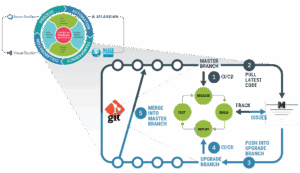
Implementing Continuous Modernization in your DevOps pipeline
Successful adoption of Continuous Modernization requires proactive, systematic processes and the right tooling. Here’s how mature CM practices typically integrate with existing workflows:
Automated upgrade branches
Continuous Modernization pipelines operate in dedicated upgrade branches, isolated from your main development codebase. This isolation is critical: it allows upgrade processes to run without any risk to production code or active development work.
When new software versions become available, automated systems pull your latest source code into upgrade branches and apply the necessary updates. This happens continuously in the background while your team continues normal development activities.
Integration with existing CI/CD testing
After upgrades are applied in the isolated branch, your standard regression test suites run automatically. This leverages all the testing infrastructure you’ve already built – unit tests, integration tests, end-to-end tests, and performance benchmarks.
If tests pass, the upgrade branch can be merged back into your main development line. If tests fail, the issues are logged, tracked, and remediated before any code reaches production.
Customizable upgrade rules
Every application and organization has unique requirements. An effective Continuous Modernization platform allows teams to customize the upgrade process. This usually means defining which dependencies to prioritize, establishing version constraints, specifying breaking change policies, and setting approval workflows.
These rules ensure the modernization process aligns with your organization’s risk tolerance and change management practices.
The business case for Continuous Modernization
While Continuous Modernization is fundamentally a technical practice, it delivers measurable business value:
Predictable maintenance costs: Regular, small updates cost less and are more predictable than emergency modernization projects. Finance teams appreciate the ability to budget for steady-state maintenance rather than lumpy capital investments.
Faster time-to-market: In one study, Stripe found that developers spend an average of 13.5 hours per week addressing technical debt, translating to 33% of their time spent on maintenance rather than shipping new features. When technical debt is kept under control, development teams spend more time shipping features and less time fighting antiquated tooling.
Reduced risk: Large-scale modernization projects are inherently risky: they touch many parts of the system simultaneously and often require extended testing periods. Continuous Modernization distributes that risk across many smaller, less risky changes.
Extended application lifespan: Custom applications represent significant investments. Continuous Modernization helps organizations maximize the return on those investments by keeping systems viable longer without requiring costly rewrites.
Getting started with Continuous Modernization
If your organization is dealing with aging custom applications, mounting technical debt, or expensive modernization cycles, it’s time to consider a Continuous Modernization approach.
Start by identifying applications that are critical to operations but beginning to show their age. Look for systems where dependencies are more than a few versions behind, security patches are piling up, or it’s becoming difficult to find engineers willing to work on outdated tech stacks.
These applications are ideal candidates for implementing Continuous Modernization pipelines. With the right platform and processes in place, you can transform them from growing liabilities into well-maintained, modern assets.
The shift to Continuous Modernization doesn’t happen overnight, but the investment pays dividends. Organizations that adopt CM spend less time in crisis mode and more time delivering value. They maintain more secure, stable, and sustainable application portfolios. And they position themselves to take advantage of new technologies and capabilities as they emerge, rather than being held back by ever-snowballing legacy technical debt.
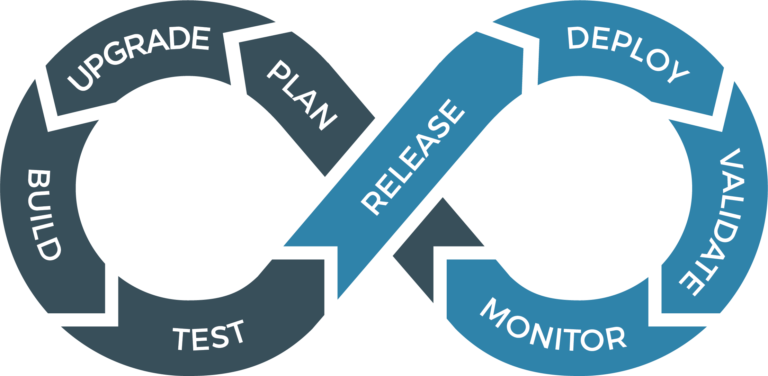
Continuous Modernization FAQ
What types of applications benefit most from Continuous Modernization?
Continuous Modernization is most valuable for business-critical custom applications that you plan to maintain long-term. This includes internal enterprise applications, customer-facing APIs, and proprietary platforms that are actively used but not under constant feature development.
How is Continuous Modernization different from regular software maintenance?
Traditional software maintenance is reactive: teams address issues as they arise or tackle updates when they become urgent. Continuous Modernization is proactive and systematic, establishing automated processes that continuously evaluate and apply updates before they become problems. It’s the difference between regularly rotating your tires and changing your oil versus waiting until your car breaks down.
Does Continuous Modernization work with legacy applications?
Yes, although implementing Continuous Modernization for legacy applications may require some initial setup work. The first step typically involves getting the application into source control (if it isn’t already), establishing basic automated testing, and documenting dependencies. Once these foundations are in place, Continuous Modernization processes can be applied even to older systems. In fact, legacy applications stand to benefit the most from CM adoption since they typically carry the most technical debt.
How much does Continuous Modernization cost compared to periodic modernization projects?
While Continuous Modernization requires ongoing investment in tooling and processes, organizations typically find that regular, incremental updates cost significantly less than periodic, large-scale modernization initiatives – both in direct expenses and in the opportunity cost of stretched resources and delayed features. Additionally, costs become more predictable and can be budgeted as operational expenses rather than unpredictable capital projects.
Will Continuous Modernization break our applications?
When properly implemented, Continuous Modernization actually reduces the risk of breakage. In Synchrony Systems’ Modernization Lifecycle Platform (MLP), updates happen in isolated branches and go through full regression testing before merging. Issues are caught early when they’re easier to fix. Compare this to letting dependencies age for years and then attempting a massive update – the latter scenario is far more likely to cause unexpected problems.
How long does Continuous Modernization take?
By proactively performing regular, incremental updates, organizations avoid the need for painful, expensive “big bang” modernization projects. With Continuous Modernization, modernization cycles usually occur four times per year and take approximately 2-4 weeks. This includes automated dependency updates, code transformations, and full regression testing.
Can Continuous Modernization handle breaking changes in dependencies?
Yes. Sophisticated Continuous Modernization platforms can apply transformation rules to adapt code when dependencies introduce breaking changes. For complex breaking changes that require architectural decisions, the process pauses for human review and input. Teams can also establish policies around accepting major version updates versus sticking with minor and patch releases.
What happens when an update fails testing?
When an automated update fails regression testing, the issue is logged and tracked just like any other bug. The upgrade stays in the isolated branch and your main codebase is unaffected. Teams can investigate the failure, adjust upgrade rules if needed, or decide to skip that particular version and wait for the next release. This failure-and-remediation cycle happens safely, away from production code.
Do we need special tools to implement Continuous Modernization?
While you can cobble together Continuous Modernization processes using standard CI/CD tools and custom scripting, specialized platforms designed for Continuous Modernization – like Synchrony’s Modernization Lifecycle Platform – make the process significantly more efficient and reliable. These platforms provide pre-built upgrade rules, customizable workflows, and integration with existing DevOps toolchains.
How does Continuous Modernization fit with our existing CI/CD pipeline?
Continuous Modernization runs parallel to your standard CI/CD pipeline rather than replacing it. Upgrade branches feed into your existing testing and deployment infrastructure. Most organizations find that Continuous Modernization enhances their DevOps practices rather than conflicting with them, adding another dimension of automation and reliability to their software delivery process.