
Your privacy matters. We’ve updated our policies effective March 24, 2026.

LEARN MORE

Can continuous modernization prevent tech debt?

When was the last time your development team proposed a major software modernization project?

If it feels like you’re always either planning one, executing one, or recovering from one, the true problem may lie in your approach to modernization.

Most organizations discover their technical debt only after it’s metastasized: when security vulnerabilities force urgent patches, when critical dependencies reach end-of-life, or when talented developers refuse to work on outdated tech stacks. By then, what started as deferred maintenance has ballooned into a protracted six-figure overhaul.

Is adopting a Continuous Modernization (CM) approach the only surefire way to prevent an avalanche of technical debt?

What is Continuous Modernization?

Continuous Modernization is a proactive software maintenance strategy that systematically updates your proprietary applications, APIs, and internal software components as part of your regular development workflow. Rather than allowing dependencies to age until they require massive overhaul projects, CM integrates incremental updates directly into your existing DevOps processes.

Continuous Modernization is a natural extension of CI/CD practices. Just as Continuous Integration and Continuous Deployment automate testing and releases, Continuous Modernization automates the process of keeping your technology stack current with the latest versions of databases, frameworks, SDKs, and third-party libraries.

The hidden cost of deferred updates

Here’s a scenario that plays out repeatedly across enterprise IT departments: an application launches successfully with modern dependencies. Development teams move on to new projects. Months pass, then years. Meanwhile, that once-current application quietly falls behind. What begins as a minor version lag – perhaps staying on an older database driver or postponing a framework update – compounds over time. Before long, your “stable” application is running on unsupported software versions with known security vulnerabilities and compatibility issues.

When the gap becomes too wide to ignore, you’re forced to launch a major modernization initiative. Development resources that should be building revenue-generating features instead get redirected to upgrade work that delivers no visible value to stakeholders. The maintenance burden that was once manageable has transformed into an expensive, high-risk project.

McKinsey finds that technical debt accounts for roughly 40% of IT balance sheets – and adds 10-20% to the costs of any given IT project.

How Continuous Modernization prevents tech debt accumulation

Continuous Modernization flips this reactive approach on its head. Instead of waiting until upgrades become emergencies, organizations establish automated pipelines that handle updates incrementally and continuously.

The process works by running parallel upgrade tracks alongside your standard development workflow. When new versions of dependencies become available, they’re automatically tested against your codebase in isolated environments. Issues are identified early when they’re still small and manageable, rather than discovering compatibility problems years later when dozens of dependencies demand simultaneous updates.

This approach delivers several key advantages:

Smaller, manageable changes: Updating one or two dependencies at a time is significantly less risky than upgrading an entire stack simultaneously. Each change can be thoroughly tested and validated before moving forward.

Reduced upgrade complexity: When applications stay relatively current, upgrade paths remain straightforward. The documentation and community support for recent version transitions is robust, and breaking changes are well documented.

Lower resource requirements: Small, regular updates require far less time and effort than infrequent, massive overhauls that grind productivity to a halt. Teams can handle modernization work within normal cycles rather than requiring dedicated projects.

Improved security posture: Security patches and vulnerability fixes get applied promptly rather than languishing in a backlog of deferred maintenance work.

Better developer experience: Engineers spend less time wrestling with legacy technology and more time working with modern tools and patterns.
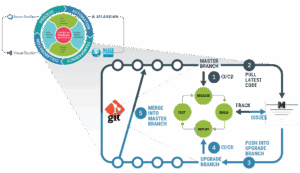
A flow chart showing the Continuous Modernization process


Implementing Continuous Modernization in your DevOps pipeline

Successful adoption of Continuous Modernization requires proactive, systematic processes and the right tooling. Here’s how mature CM practices typically integrate with existing workflows:

Automated upgrade branches

Continuous Modernization pipelines operate in dedicated upgrade branches, isolated from your main development codebase. This isolation is critical: it allows upgrade processes to run without any risk to production code or active development work.

When new software versions become available, automated systems pull your latest source code into upgrade branches and apply the necessary updates. This happens continuously in the background while your team continues normal development activities.

Integration with existing CI/CD testing

After upgrades are applied in the isolated branch, your standard regression test suites run automatically. This leverages all the testing infrastructure you’ve already built – unit tests, integration tests, end-to-end tests, and performance benchmarks.

If tests pass, the upgrade branch can be merged back into your main development line. If tests fail, the issues are logged, tracked, and remediated before any code reaches production.

Customizable upgrade rules

Every application and organization has unique requirements. An effective Continuous Modernization platform allows teams to customize the upgrade process. This usually means defining which dependencies to prioritize, establishing version constraints, specifying breaking change policies, and setting approval workflows.

These rules ensure the modernization process aligns with your organization’s risk tolerance and change management practices.

The business case for Continuous Modernization

While Continuous Modernization is fundamentally a technical practice, it delivers measurable business value:

Predictable maintenance costs: Regular, small updates cost less and are more predictable than emergency modernization projects. Finance teams appreciate the ability to budget for steady-state maintenance rather than lumpy capital investments.

Faster time-to-market: In one study, Stripe found that developers spend an average of 13.5 hours per week addressing technical debt, translating to 33% of their time spent on maintenance rather than shipping new features. When technical debt is kept under control, development teams spend more time shipping features and less time fighting antiquated tooling.

Reduced risk: Large-scale modernization projects are inherently risky: they touch many parts of the system simultaneously and often require extended testing periods. Continuous Modernization distributes that risk across many smaller, less risky changes.

Extended application lifespan: Custom applications represent significant investments. Continuous Modernization helps organizations maximize the return on those investments by keeping systems viable longer without requiring costly rewrites.

Getting started with Continuous Modernization

If your organization is dealing with aging custom applications, mounting technical debt, or expensive modernization cycles, it’s time to consider a Continuous Modernization approach.

Start by identifying applications that are critical to operations but beginning to show their age. Look for systems where dependencies are more than a few versions behind, security patches are piling up, or it’s becoming difficult to find engineers willing to work on outdated tech stacks.

These applications are ideal candidates for implementing Continuous Modernization pipelines. With the right platform and processes in place, you can transform them from growing liabilities into well-maintained, modern assets.

The shift to Continuous Modernization doesn’t happen overnight, but the investment pays dividends. Organizations that adopt CM spend less time in crisis mode and more time delivering value. They maintain more secure, stable, and sustainable application portfolios. And they position themselves to take advantage of new technologies and capabilities as they emerge, rather than being held back by ever-snowballing legacy technical debt.
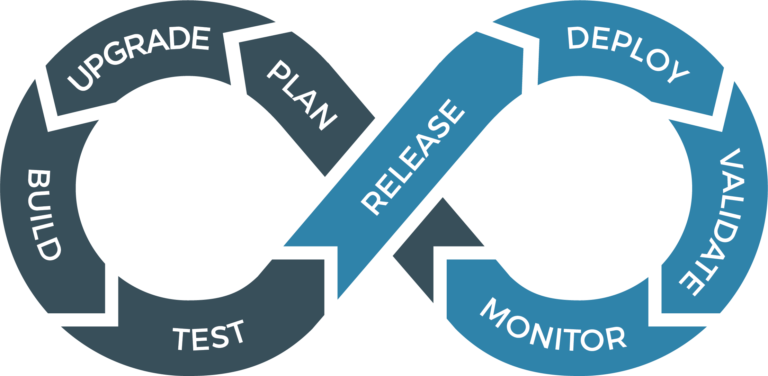

Continuous Modernization FAQ

What types of applications benefit most from Continuous Modernization?

Continuous Modernization is most valuable for business-critical custom applications that you plan to maintain long-term. This includes internal enterprise applications, customer-facing APIs, and proprietary platforms that are actively used but not under constant feature development. 

How is Continuous Modernization different from regular software maintenance?

Traditional software maintenance is reactive: teams address issues as they arise or tackle updates when they become urgent. Continuous Modernization is proactive and systematic, establishing automated processes that continuously evaluate and apply updates before they become problems. It’s the difference between regularly rotating your tires and changing your oil versus waiting until your car breaks down.

Does Continuous Modernization work with legacy applications?

Yes, although implementing Continuous Modernization for legacy applications may require some initial setup work. The first step typically involves getting the application into source control (if it isn’t already), establishing basic automated testing, and documenting dependencies. Once these foundations are in place, Continuous Modernization processes can be applied even to older systems. In fact, legacy applications stand to benefit the most from CM adoption since they typically carry the most technical debt.

How much does Continuous Modernization cost compared to periodic modernization projects?

While Continuous Modernization requires ongoing investment in tooling and processes, organizations typically find that regular, incremental updates cost significantly less than periodic, large-scale modernization initiatives – both in direct expenses and in the opportunity cost of stretched resources and delayed features. Additionally, costs become more predictable and can be budgeted as operational expenses rather than unpredictable capital projects.

Will Continuous Modernization break our applications?

When properly implemented, Continuous Modernization actually reduces the risk of breakage. In Synchrony Systems’ Modernization Lifecycle Platform (MLP), updates happen in isolated branches and go through full regression testing before merging. Issues are caught early when they’re easier to fix. Compare this to letting dependencies age for years and then attempting a massive update – the latter scenario is far more likely to cause unexpected problems.

How long does Continuous Modernization take?

By proactively performing regular, incremental updates, organizations avoid the need for painful, expensive “big bang” modernization projects. With Continuous Modernization, modernization cycles usually occur four times per year and take approximately 2-4 weeks. This includes automated dependency updates, code transformations, and full regression testing.

Can Continuous Modernization handle breaking changes in dependencies?

Yes. Sophisticated Continuous Modernization platforms can apply transformation rules to adapt code when dependencies introduce breaking changes. For complex breaking changes that require architectural decisions, the process pauses for human review and input. Teams can also establish policies around accepting major version updates versus sticking with minor and patch releases.

What happens when an update fails testing?

When an automated update fails regression testing, the issue is logged and tracked just like any other bug. The upgrade stays in the isolated branch and your main codebase is unaffected. Teams can investigate the failure, adjust upgrade rules if needed, or decide to skip that particular version and wait for the next release. This failure-and-remediation cycle happens safely, away from production code.

Do we need special tools to implement Continuous Modernization?

While you can cobble together Continuous Modernization processes using standard CI/CD tools and custom scripting, specialized platforms designed for Continuous Modernization –  like Synchrony’s Modernization Lifecycle Platform – make the process significantly more efficient and reliable. These platforms provide pre-built upgrade rules, customizable workflows, and integration with existing DevOps toolchains.

How does Continuous Modernization fit with our existing CI/CD pipeline?

Continuous Modernization runs parallel to your standard CI/CD pipeline rather than replacing it. Upgrade branches feed into your existing testing and deployment infrastructure. Most organizations find that Continuous Modernization enhances their DevOps practices rather than conflicting with them, adding another dimension of automation and reliability to their software delivery process.
 

Modernization 2.0: legacy to microservices transformation

Migrating to a cloud-native architecture is one of the most powerful ways to improve business agility. The modern cloud delivers virtually unlimited, on-demand compute power, enabling platforms to scale instantly to meet demand. It’s no surprise that 94% of companies worldwide already use cloud computing in some capacity, and 97% of IT leaders plan to expand their cloud systems in the next few years (source).

Yet many enterprises remain constrained by legacy, monolithic applications. These systems hold critical business logic but act as bottlenecks to digital transformation. Insurance applications, banking platforms, and other unique software systems have been built over the course of decades in languages like PowerBuilder, EGL, and Smalltalk, among others. These types of systems require a flexible, customizable, scalable, and agile modernization process that can be easily jump-started to deliver incremental results.

But how can you untangle a complex monolith without disrupting stable functionality and critical business operations? After all, carving out pieces of a monolithic system is a manual, labor-intensive, and time-consuming process. To move forward in today’s climate, organizations need a controlled, automated approach that ensures critical functions can be safely modernized, tested, and deployed in a timely manner.

Architectural breakthrough: microservices + micro-frontends

The optimal solution lies in a more modern architecture built on microservices and micro-frontends. Microservices are a web of independent, modular components that can be scaled, updated, and reused individually. Micro-frontends are user-facing components that can operate either independently or as a cohesive whole.

Modernizing the front end is just as important as modernizing straight business logic. Forrester Research finds that companies investing in UI/UX design see a $100 return for every $1 spent. Outdated interfaces remain one of the most immediate barriers for legacy applications, and micro-frontends directly address this need.

Synchrony Systems’ Modernization Lifecycle Platform (MLP) comes equipped with end-to-end automation for extracting “subsets” of business logic and user interface, and transforming them into reusable components for microservices and micro-frontends. This enables organizations to modernize their monolithic legacy applications into a hyperscale cloud architecture. By focusing on the high-value business functionality first, Synchrony helps accelerate modernization timelines so enterprises can deploy and test migrated functions and complete features continuously in months instead of years.

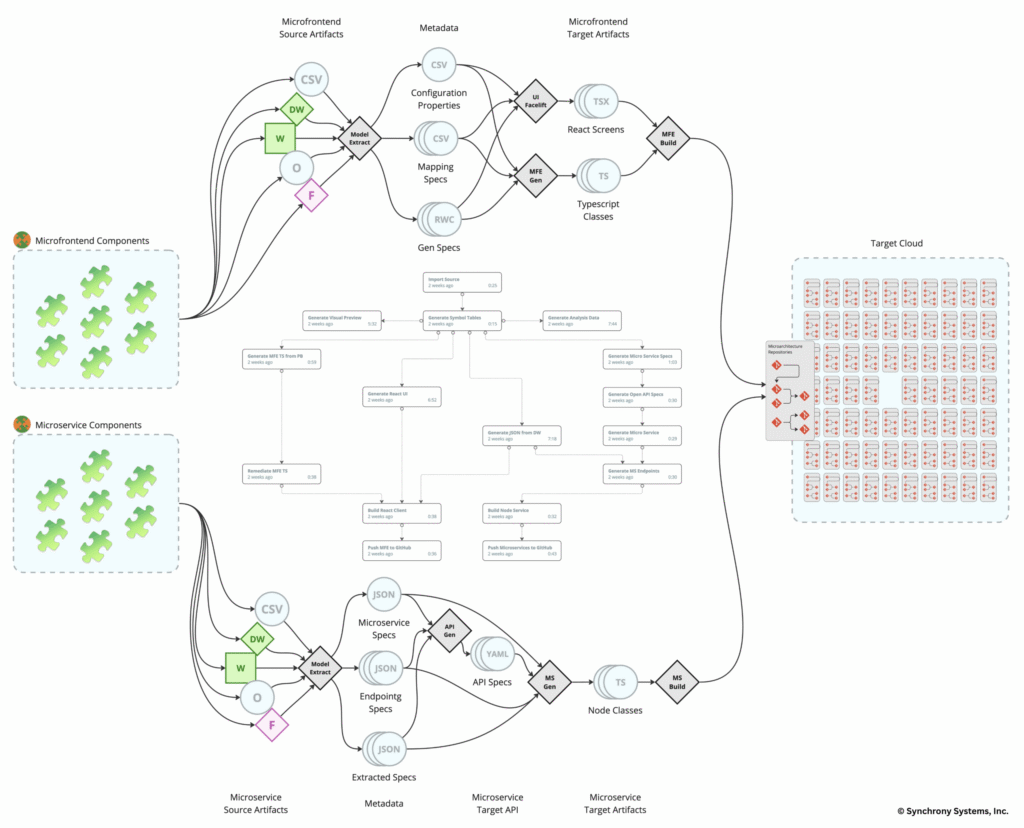
The illustration below shows how MLP orchestrates a modernization solution from a PowerBuilder monolithic architecture to a target microarchitecture with a TypedScript/React frontend and a TypedScript/Node.js backend as the target programming languages. (click image to enlarge)

Illustration of how MLP orchestrates a modernization solution from a PowerBuilder monolithic architecture to a target microarchitecture with a TypedScript/React frontend and a TypedScript/Node.js backend as the target programming languages

How monoliths become microservices and micro-frontends

Rather than migrating monolithic legacy codebases wholesale or “as-is,” Synchrony offers a technology-assisted reengineering process and workflow that is iterative, incremental, and analysis-driven.

Analytics and application rationalization

First, an exhaustive analytical inspection of your legacy application is performed using modernization technology purpose-built to identify and extract high-value business scenarios and their execution paths. This analysis produces targeted, self-contained components (a.k.a. “subsets”) for every identified business scenario embedded inside each monolithic codebase. This extraction acts as the foundation for exposing the hidden application “component vocabulary” in terms of application layers, subsystems, and business functions. Powered by the newly exposed knowledge of your system, the extracted component architecture becomes the stepping stone that drives continuous and incremental modernization toward the target cloud component architecture.

Target architecture metadata harness

The new application component architecture is the first representation and visualization of the formerly monolithic application’s structural decomposition into a granular micro-frontend/microservice layer. The component model is used for generating the required metadata that drives the execution of every modernization service agent, such as: a) data access generation; b) business objects generation; and c) UI facelift generation into a reactive frontend. This is where client-specific requirements are also incorporated to align with IT’s model target architecture.

Fine-tuning the transformation engine

The breakdown of subsets further undergoes an iterative process that identifies micro-frontends, microservices, and common layers used by both. An interactive process identifies UI/UX requirements and service layer requirements (typically slated for data access) to produce highly granular, reusable, and scalable components on the target. The process results in custom-tailored code refactoring, transformation, and generation, rules knowledgebases (KBs) for target business services, and facelift rules for a modern, reactive target web frontend.

Orchestrating modernization workflows

The analytics, metadata harness, and fine-tuned transformation knowledgebase are all assembled into custom-tailored workflows. When executed end-to-end, they produce the desired target architecture, consisting of hundreds and often thousands of structural (repositories) and microarchitectural (microservices and micro-frontends) components. Workflows can be invoked on demand by users or triggered by specific events, such as commits to newly generated code or updates to the metadata harness or KB. The holistic integration of code, tools, and processes ensures that the modernization project runs efficiently and at scale.

Continuous modernization

All units of execution inside a workflow, known as “autoflows,” can be thought of as pipelines of pipelines that enable continuous execution of the entire modernization lifecycle. The original monolithic application architecture is incrementally decomposed into independent, atomic, and stateless microservices and self-contained, reusable micro-frontends, ready for deployment into IT-specific cloud environments. The result is a transformed application with cloud-native architecture and modern UI/UX, preserving the original business logic and retaining 100% functional equivalence.

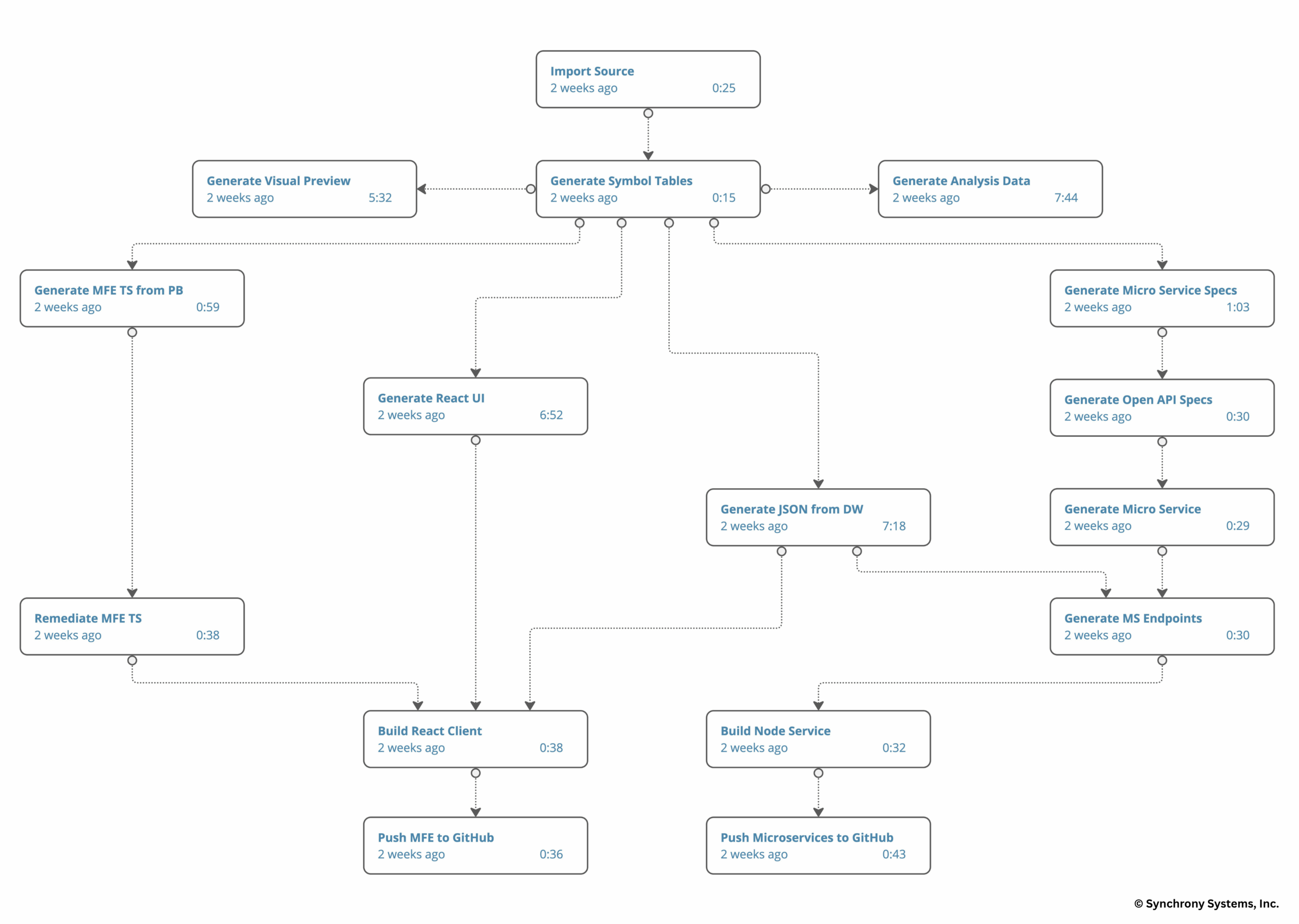
The illustration below shows an end-to-end customized MLP modernization workflow for monolithic client/server desktop applications. (click image to enlarge)

Illustration shows an end-to-end customized MLP modernization workflow for monolithic client/server desktop applications

Why modernizing to microservices and micro-frontends improves speed and agility

  • Customers can continuously extract high-value functionality and features from their legacy applications at their own pace and timeframe, until everything is modernized.
  • Eliminating dead code and breaking the monolithic functionality into a web of independent microarchitecture components eliminates technical debt and fosters technological agility.
  • Legacy applications get fully transformed into modern target architectures, unlike the like-for-like, “as-is” transformations that preserve the legacy architectural semantics, making it hard to be agile and scalable on modern target platforms.
  • Microservices and micro-frontends are delivered incrementally as early milestones for customers to test and deploy into production piecemeal, rather than waiting for the entire application to be modernized.
  • Built for flexibility and adaptation, Synchrony’s modernization platform conforms to the customer’s specific target architecture, tooling, and requirements (e.g., RESTful, Kubernetes, cloud infrastructure, API gateway, widget libraries, data access harnesses, etc.) rather than dictating a standardized solution.

Real-world transformation: from monoliths to microarchitectures

Modernizing monolithic application architectures into microarchitectures enables companies to untangle decades of core domain functionality and extract it into highly reusable components. Synchrony has helped dozens of teams extract and transform critical domain functionality and UI from their legacy client/server or host/mainframe monolithic architectures into reusable target microarchitectures.

PowerBuilder

A PowerBuilder client/server application subset (after removing dead code and selecting the initial set of high-value components) with a traditional monolithic architecture:

  • Windows → 323
  • Data Windows → 1,908
  • Lines of Code (LOC) → 416K

Yields the following cloud microarchitecture:

  • Micro-frontends → 47
  • Microservices → 488
  • Repositories → 1,650

Would you like to learn how this could be applied to your in-house legacy applications?

Contact us to meet with our senior modernization specialists for an in-depth conversation and consultation about the target architecture options your in-house portfolio of legacy applications can take.


Microarchitecture in legacy application modernization FAQ

This FAQ addresses common questions about our technology, drawing from our expertise in modernization. Whether you’re a developer, architect, or CTO, these insights can help you understand how to revitalize your tech stack without disrupting operations.

What is microservices extraction in legacy application modernization?

Synchrony Systems’ Microservices Extraction technology is an automated tool that untangles complex legacy monoliths and converts them into a network of reusable microservices and microfrontends. It focuses on extracting subsets of business logic and user interfaces from languages such as PowerBuilder, EGL, and Smalltalk. This process creates independent, modular components that can be scaled, updated, and deployed individually in a cloud-native environment, such as TypeScript/React for frontends and TypeScript/Node.js for backends.

Why should enterprises modernize legacy applications into microarchitectures?

Legacy applications are, by definition, outdated. They are built on aging infrastructure and rely on a talent pool nearing retirement to keep running. These systems inherently limit scalability, agility, and innovation. By modernizing to microservices and micro-frontends, organizations can leverage the cloud’s on-demand compute power, enabling instant scaling to meet demand. This shift eliminates technical debt, fosters technological agility, and allows for incremental improvements without a full overhaul.

How does Synchrony Systems’ platform differ from traditional modernization approaches?

Traditional methods often involve manual, labor-intensive processes or “as-is” migrations that preserve outdated semantics, making it hard to achieve true agility. Synchrony’s platform uses end-to-end automation for an iterative, incremental, analysis-driven reengineering process. It avoids wholesale migrations by focusing on high-value business scenarios first, delivering functional equivalents in months rather than years. The result is a hyperscale cloud architecture tailored to your specific requirements, including RESTful services, Kubernetes, and custom API gateways.

What are microservices and micro-frontends, and why are they important?

Microservices are independent, modular backend components that handle specific business functions, allowing them to be scaled, updated, or reused without affecting the entire system. Microfrontends are user-facing UI components that can operate standalone or integrate seamlessly. Together, they create a flexible “web” of components that improve speed, reusability, and overall application performance.

What is Synchrony’s step-by-step process for microservices extraction?

The process is built into the Modernization Lifecycle Platform (MLP) and includes several key phases:

  • Analytics and application rationalization: An exhaustive analysis identifies high-value business scenarios and extracts self-contained components, revealing the application’s hidden “component vocabulary” across layers, subsystems, and functions.
  • Target architecture metadata harness: This generates metadata to drive modernization agents, incorporating client-specific requirements for data access, business objects, and reactive UI generation.
  • Fine-tuning the transformation engine: Subsets are broken down into granular micro-frontends and microservices. An interactive process refines UI/UX and service layer needs, creating custom refactoring rules and knowledgebases.
  • Orchestrating modernization workflows: Analytics, metadata, and transformation rules are assembled into custom workflows that produce structural repositories and microarchitectural components. These can be triggered on demand or by events like code commits.
  • Continuous modernization: Workflows run as “autoflows” (pipelines of pipelines), incrementally decomposing the monolith into atomic, stateless components ready for cloud deployment. The final output is a fully transformed application that preserves business logic and is 100% functionally equivalent.

If the modernization process is automated, how does it ensure safety?

Synchrony’s MLP emphasizes controlled automation to avoid disrupting stable functionality. It uses purpose-built technology for inspection, extraction, and transformation, ensuring critical functions are modernized, tested, and deployed safely and accurately. Automation handles the heavy lifting, but the process includes iterative fine-tuning and interactive elements to incorporate your team’s input throughout the modernization process, minimizing risks and maintaining operational continuity.

Can modernization be done incrementally without a big-bang approach?

Absolutely. MLP enables continuous extraction of high-value functionality at your own pace. Microservices and microfrontends are delivered as early milestones, enabling testing and piecemeal production deployment. This eliminates the need to wait for the entire application to be modernized, reducing downtime and accelerating timelines from years to months.

What benefits does this technology provide in terms of speed and agility?

  • Reduced technical debt: Breaks down monoliths into independent components, eliminating dead code and enabling easier updates.
  • Improved scalability and flexibility: Components conform to your target architecture (e.g., cloud infrastructure, widget libraries), fostering reuse across teams.
  • Faster time-to-market: Incremental deployments mean quicker value realization from high-priority features.
  • Improved UI/UX: Transforms outdated interfaces into modern, reactive frontends, enhancing user experience and ROI.
  • Full transformation: Unlike “as-is” methods, it delivers a truly cloud-native architecture for long-term agility.

Which legacy languages and systems does Synchrony support?

MLP is designed for a variety of legacy systems, including client/server desktop applications written in languages such as PowerBuilder, EGL, Smalltalk, VisualGen, COBOL, and more. It’s flexible and customizable, able to handle unique monolithic architectures across insurance, banking, and other industries.

How can I get started with Synchrony Systems’ Microservices Extraction technology?

Contact us to connect with our senior modernization specialists.


10 app modernization mistakes to avoid

Modernization promises the benefits of a modern, cloud-based tech stack, including remaining competitive, innovating quickly, supporting mobile, and reducing security risks. Yet app modernization initiatives are fraught with complexity. Sadly, over 75% of modernization projects fail, according to multiple studies conducted on mainframe and application modernizations.

Executives, architects, and technical teams must be aware of the warning signs that a modernization project is starting to go sideways. Here are ten app modernization mistakes to avoid to increase your chances of a successful initiative.

1. Shortcutting modernization readiness homework

The devil is in the details regarding app modernization. While limited documentation, technology expertise, or even historical context for changes in the legacy application are common problems, the more significant risk with application modernizations is the inability to scope the project properly. Making assumptions rather than conducting an actual modernization readiness assessment often leads to underestimating the size and complexity of the technical debt and, hence, the overall effort required for the modernization. As a result, the project is set up for failure before it even begins.

2. Treating application modernization like a typical software development project

Nothing could be further from the truth. These applications typically run critical parts of the business, and modernization efforts must be managed in parallel to support the day-to-day business operations. Unlike the typical greenfield development lifecycle, where many engineers make many small incremental changes to one program or function at a time, a modernization project makes wholesale changes to millions of lines of code simultaneously and repeatedly. Planning a modernization project like a greenfield project is a huge mistake.

3. Assuming a good migration tool is the only key to a successful modernization

Machine-driven migration tools are crucial to modernization projects, but they are just a part of a successful modernization project. These tools are akin to best-of-breed compilers and their role in greenfield application development. Yes, we need a good compiler, but without the well-established best practices of DevOps, no compiler by itself can ensure the successful completion of a software development project. So yes, we need good migration tools. Still, they must be integrated into holistic modernization processes that help bring migrated code to production quality, see it through to production release, and retire the legacy application.

4. Overreliance on code migration tools

Piggybacking on the above, teams always investigate the available code migration tools. Automated code transformation takes care of only a third of the work in a complex modernization project with many moving parts and stakeholders. Without integration of migration tools with CI/CD build pipelines, defect management, test management, code synchronization between parallel development and migration tracks, project management, analytics, reporting, and more, it will be impossible to successfully manage such complex projects and see them through to completion.

5. Underestimating the difficulty of modernizing a moving target

Applications that require modernization are often live/running systems that undergo development – bug fixes, enhancements, feature requests, integrations, etc. – based on the needs of the business. Halting development or freezing the application code isn’t feasible, especially when today’s modernization projects average sixteen to twenty-four months or more. The biggest Achilles heel of modernization is the inability to keep up with the rate of change happening to the application while it’s undergoing modernization.

6. Trying to modernize everything at the same time

The end-state is clear. A modernized application will use modern technology, be cloud- and mobile-ready, and embrace current UI/UX best practices. However, the system to be modernized is typically monolithic and was developed with what today would be considered obsolete software development practices. Trying to tackle this challenge all at once significantly increases the risk of failure as it drives up the demand on resources, time, and costs and ultimately erodes the trust of senior executives and project sponsors. Instead, develop a minimal viable product, or MVP, modernization roadmap. An incremental approach will still result in wholesale modernization, but it’s being done piecemeal. This incremental approach makes modernization more manageable, trackable, and measurable and de-risks the entire project.

7. Not having project visibility

Large-scale, complex application modernizations often require internal resources and several external partners with specific migration expertise. The work is usually managed via spreadsheets, Gantt charts, project management or collaboration tools, and constant status calls. Outside the project management activity, the modernization work occurs in various development environments siloed to the teams working in their particular areas. So, despite everyone’s best intentions, modernizations are fraught with miscommunication, delays, and project bloat, costing more money and time. These challenges must be acknowledged and addressed as part of the overall modernization strategy and, where possible, solved with modernization lifecycle management solutions.

8. Tracking the wrong modernization success metrics

Some metrics show project progress but may not be success indicators. For example, measuring the number of migrated lines of code or how much code compiles doesn’t mean the code is actually running. Additional metrics that track the progress of the modernization are how much code is executing or code coverage, the impact of a new version of a code drop, and the overall project trends.

9. Claiming victory too early

Once the modernized application is in production, it’s tempting to sunset the legacy application as quickly as possible. After all, maintaining legacy applications takes resources that could be deployed on other strategic initiatives. However, the modernized application must be exercised in production for enough time to ensure that the migrated code operates as expected in the day-to-day operations. Sunsetting the application too early prevents a quick remigration using updated automation rules and instead forces a development team to prioritize, schedule, and address these issues manually during a development sprint.

10. Ignoring employee impact

Modernization is more than technology. It often triggers a fundamental shift in development processes and team organization, with many companies adopting DevOps principles, cloud deployment, and modern development best practices. It’s a sea change for the developers who are maintaining the legacy application. Therefore, it is essential to consider and plan for the impact on employees post-modernization.

About Synchrony Systems and our app modernization technology

We have reimagined how application modernizations are executed. Our technology has helped some of the world’s largest brands with assessments, readiness analyses, roadmaps, application migrations, and application transformations. Contact us today to learn how we can help you.


How AI is transforming tech debt management

Every enterprise operates with some degree of tech debt. With millions of lines of legacy code powering critical operations, tech debt is inevitable—eventually, all code becomes outdated. While tech debt isn’t inherently “bad,” it can limit an enterprise’s ability to adapt, innovate, and remain competitive.Addressing tech debt isn’t just about identifying issues; it’s about managing them across an enterprise modernization initiative with orchestration, insight, and accountability. That’s where platforms like MLP (Modernization Lifecycle Platform) become essential.

AI-powered modernization solutions offer advanced capabilities to enhance the assessment and management of tech debt, such as:

Automated code analysis

AI-powered tools can automatically analyze codebases to detect code smells, architectural issues, and other indicators of tech debt. For example, CodeScene uses machine learning algorithms to identify patterns in version control data, highlighting hotspots, i.e., code areas frequently modified and may require attention. This behavioral code analysis helps prioritize tech debt mitigation efforts.

Predictive maintenance

AI can predict which parts of the code will likely cause future issues by analyzing historical data and code evolution patterns. This foresight enables teams to proactively address potential problems before they escalate, effectively managing tech debt.

Prioritization of refactoring efforts

AI can assess the impact of tech debt on various aspects of software performance and maintainability, helping teams prioritize refactoring efforts based on factors like code complexity, defect density, and contribution to business goals. Tools like NDepend provide metrics and visualizations that assist in understanding and managing tech debt within .NET applications.

Estimation of remediation costs

AI can estimate the effort required to address specific tech debt items, enabling better planning and resource allocation. The SQALE method, for instance, offers a framework for assessing source code quality and estimating the remediation costs associated with tech debt.

Continuous monitoring and reporting

AI-driven tools can continuously monitor codebases for new tech debt instances, providing developers real-time feedback. This continuous integration ensures that tech debt is managed proactively, preventing its accumulation over time.

These AI capabilities are most effective when deployed within a unified modernization framework. MLP provides the end-to-end infrastructure to integrate AI into each phase of tech debt remediation, from initial discovery and impact assessment to automated code transformation and final validation. By embedding AI tooling into the MLP workflow, organizations can move beyond static analysis to execute modernization plans with measurable outcomes and full traceability.

Platforms like MLP make this integration actionable by supporting AI-assisted analysis and rule-based automation across diverse environments, including mainframe, midrange, and distributed systems. MLP’s ability to coordinate modernization assets, automate repetitive tasks, and generate audit trails gives enterprises a practical path to address tech debt while aligning modernization efforts with business priorities.

By integrating AI into the software development lifecycle, organizations can significantly enhance their ability to identify, assess, and manage tech debt. This will lead to more maintainable codebases, efficient development processes, and a stronger foundation for future innovation.

Smalltalk to Java FAQ: parcIT modernization

This FAQ summarizes how parcIT saved seven years by modernizing Smalltalk applications to Java with Synchrony Systems. The in-depth, 24-page report is available here.

1. Why did parcIT decide to migrate its Smalltalk applications to Java?

parcIT’s shift from Smalltalk to Java wasn’t a spur-of-the-moment decision. It was a strategic  move influenced by several pivotal factors:

  • Industry trends: The software world was moving away from Smalltalk, making it harder to find skilled developers to maintain and enhance Smalltalk systems.
  • Customer perception: Customers started viewing Smalltalk as a relic of the past, hurting brands of forward-thinking companies.
  • Maintenance challenges: These were twofold. First, the general maintenance and support burden on a handful of remaining Smalltalk developers of the large and still growing Smalltalk codebase. Second, the increased complexity of the software needing to interoperate with newer product features being developed in Java.

2. What hurdles did parcIT encounter during the migration to Java?

The journey wasn’t without its fair share of bumps:

  • Dynamic vs. static typing: Smalltalk’s dynamic typing posed challenges when mapping it to Java’s static type system.
  • Paradigm shifts: The “everything is an object” principle in Smalltalk, which includes primitive types, the 0-based vs. 1-based indexing of collections, full block closures vs. restricted lambda functions, and more, required a nuanced approach when translated into Java to produce maintainable software.
  • Reflection and extensions: Smalltalk’s heavy reliance on reflection and base-class extensions didn’t have direct Java counterparts, requiring a more comprehensive transformation to a first-class alternative implementation.
  • Framework gaps: Ensuring Java frameworks could effectively replicate Smalltalk’s core functionalities was no small feat, especially as it pertained to Smalltalk’s extensive Collection base-class library.

3. Why partner with Synchrony Systems for this modernization?

parcIT undertook an internal rewrite that was taking way too long. This made them realize they needed to find a vendor they could partner with to accelerate and, at the same time, de-risk the modernization. Key reasons for choosing Synchrony were:

  • Smalltalk know-how: Synchrony’s deep expertise in Smalltalk, especially with migrating complex Smalltalk applications to a variety of different targets, was pivotal.
  • Advanced tools: Synchrony’s Smalltalk Migration Technology (SMT) came loaded with features like static type inferencing, runtime type instrumentation, deep analytics, rule-based refactoring and code generation, and much more, making it a key differentiator in partner selection.
  • Collaborative spirit: Synchrony adapted its process to allow for parcIT’s active participation and control, addressing a key requirement.
  • Cloud advantage: Synchrony provided a dedicated AWS cloud environment to manage the entire modernization lifecycle.

4. How was the project structured to ensure success?

Success didn’t happen by chance—it was a result of meticulous planning:

  • Readiness phase: This included a comprehensive Smalltalk source code analysis, platform dependency analysis, component interdependency, diagnostics, and challenge identification, all of which were used to build a project plan.
  • Clear task division: Responsibilities were clearly split between parcIT and Synchrony, with parcIT developing a Java UI Compatibility Library (CL).
  • Team collaboration: A robust workflow ensured smooth interactions between the teams.
  • Parallel tracks: By handling headless and GUI application migrations simultaneously, the process was streamlined, and early testing of migrated functionality was made possible.
  • Continuous monitoring: Real-time tracking and metrics allowed for swift tactical and strategic adjustments, keeping the project on track and moving forward.

5. What strategies and tools helped overcome the technical challenges?

parcIT and Synchrony employed several smart strategies:

  • Static type inferencing: SMT’s engine minimized manual annotations by automatically inferring static types.
  • Runtime-Type Instrumentation: This tool boosted the accuracy of the static-type inferencing process.
  • Refactoring base-class extensions: SMT refactored extensions into a separate first-class extensions framework, ensuring Java compatibility and maintainability.
  • Custom code generation: The SMT rule-based knowledgebase (KB) facilitated precise, flexible, customizable, and efficient code transformation.
  • Migration subsets: Breaking down the codebase into smaller units made the migration easier to manage and test.

6. What were the key takeaways from the modernization?

parcIT learned several valuable lessons:

  • Collaboration pays off: Active team involvement led to higher code quality and a smoother transition of migrated Java code ownership.
  • Front-loaded effort: The initial stages, especially static-type inferencing, required significant upfront effort.
  • Continuous improvement: Regular updates to the migration tools were crucial for success.
  • Impact analysis: Careful evaluation of potential scope changes during the project was essential.

7. What benefits did parcIT reap from the modernization?

The migration brought about numerous advantages:

  • No more legacy issues: The previous Smalltalk challenges were eliminated with the switch to Java.
  • Faster completion: Automation significantly reduced the time needed to complete the modernization compared to a manual rewrite.
  • Easier maintainability: The new Java codebase made it easier to integrate with internal Java applications, making the software easier to scale and adapt for future needs.
  • Enhanced perception: Offering solutions on a modern platform improved parcIT’s competitive advantage.

8. How did parcIT optimize the migrated codebase post-modernization?

Post-migration, parcIT focused on fine-tuning:

  • Reducing reflection: Incrementally cutting down reflection usage improved performance and maintainability.
  • Minimizing type casting: Addressing type casting instances made the code more readable and reduced potential runtime errors.
  • Performance tweaks: They optimized Compatibility Library (CL) APIs to eliminate performance bottlenecks.

Through a combination of strategic planning, collaboration, and innovative tools, parcIT successfully navigated the complex journey from Smalltalk to Java, setting itself up for a more agile and sustainable future.

Challenges of PowerBuilder modernization

PowerBuilder is best known for its rapid application development (RAD) capabilities, particularly for building data-driven client/server business applications. It’s estimated that billions of lines of PowerBuilder code are running applications in North America alone, let alone globally.

PowerBuilder is considered to be a 4GL language. Key features of 4GL are a higher level of programming abstraction that is then used to generate the code into a lower-level language such as C or C++ and extensive components embedded into the language itself or its built-in system library. PowerBuilder is more of the latter than the former. Its WYSIWYG IDE with its event-driven programming model and all-in-one DataWindow presentation with powerful yet simplified data access CRUD capability, including sorting, filtering, computed fields, reporting, and other capabilities, is what gave it its claim to fame in its heyday.

Today, companies are looking to transform these applications to web and cloud environments to reap the benefits of their ubiquity, scalability, and global adoption. But what are the actual challenges of taking working, bespoke production applications written in PowerBuilder and transforming them into modern stateless microfrontends and microservices web architectures deployed in secure and scalable cloud platforms? Our modernization experts share some of the critical technical challenges teams face when undertaking such an endeavor.

Challenges modernizing PowerBuilder applications

Architectural differences

Generally speaking, PowerBuilder applications use a client-server architecture where the client handles much of the business logic and the server manages database access. Web applications, on the other hand, follow a more distributed architecture, often involving web servers, application servers, and browser-based web clients.

Splitting a monolith, especially a client-server, standalone, stateful monolith, into a web architecture is not for the lighthearted. Key challenges are:

  • Refactoring and decoupling presentation layout and logic from the underlying business model and logic.
  • Extracting application services into the web server tier and replacing direct access with REST calls.
  • Identifying interdependencies, interwoven user interfaces, and business logic and properly splitting it to work in the web tier.
  • Removing dependencies on stateful data access, such as open cursors and long transactions.
  • Last but not least, re-implementing the decades-old reliable software in new, and often multiple, new modern programming languages.

General code migration challenges

Modern web applications often use frameworks such as Angular, React, or Vue.js. Integrating the PowerBuilder business logic and data access layers with these frameworks requires significant refactoring and a very heavy lift in the absence of automation and refactoring tools. While dealing with a single PowerBuilder language, often target architecture requires multiple languages – JavaScript on the client and/or Java or C# on the server. In addition, PowerBuilder uses its own scripting language, providing additional capabilities for manipulating data retrieved from databases that may require a complete redo or an equivalent custom interpreter that will implement the equivalent semantics and functionality on the web.

Type safety and validation

PowerBuilder’s dynamic data typing allows flexibility but can lead to runtime errors. Migrating to a statically typed language involves enforcing type safety throughout the application, requiring an upfront investment in defining interfaces, types, and classes for consistent data handling and error prevention. Validation is often embedded inside the DataWindow objects and must be shifted to a mid-tier or form validation in the browser.

User Interface (UI) transition

PowerBuilder applications use a desktop-style UI with windows and dialogs that don’t naturally translate to a reactive web layout, especially for DataWindow 4GL-like components. Web frontend frameworks such as React offer rich UI components. Still, those components do not have all the equivalent properties and presentation semantics offered by the PowerBuilder’s rich set of controls and visual components and certainly do not provide a DataWindow equivalent functionality. If a like-for-like outcome is chosen, an initial step of modernizing a PowerBuilder application will require an equivalent DataWindow compatibility component framework to be implemented in the target web UI framework. For a more comprehensive modernization with the objective of achieving a native web UI/UX target, a more granular approach is necessary to break down the underlying data window-dependent behavior into separate independent pieces of display/presentation behavior, corresponding data access and data binding, and reporting capabilities.

Data access

The DataWindow is the PowerBuilder superpower. Its abstraction includes presentation (drawing and displaying forms that can have both simple and complex widgets), data access that includes SQL or stored procedure invocation, data binding, and transactions. A more comprehensive approach is needed to achieve functional equivalence on the web target with a smart, well-integrated compatibility library that sits on top of existing frameworks such as React or Angular. Adapting the data access layer to work with web technologies involves changes in how database connections are managed. The main challenge is the proverbial “thin-client” architecture, which implies statelessness. It’s not just that we are using different technologies for session management, connection pooling, etc.; the underlying transformation of the monolith into a microservices and microfrontends web and cloud architecture is where the real challenge lies.

Session management paradigm shift

PowerBuilder applications often rely on the session state maintained within the client application. In a modern web application, managing the client state requires technologies like Redux or another persistent data store on the browser side. Moving from a primarily client-side state management model to a distributed client-server architecture requires careful consideration of data synchronization. Depending on the application’s needs, data consistency and responsiveness are often achieved using REST APIs or WebSockets.

Performance

Whether the application is modernized for the web or built ground up for the web, it comes with the web territory of potential network latency in user response times and scalability depending on the demands of the underlying application profile. When modernizing a client-server architecture to the web, there is also the risk of potential consequential database “chattiness.” Once the application has achieved functional equivalence, attention must be placed on performance, overall application deployment, and scalability.

Security

There are differences in security practices for client-server applications and web applications. One of the most challenging parts of a PowerBuilder modernization to the web is extracting the application logic and, most importantly, the data access in the form of SQL and stored procedure calls to a web service layer. Once successfully split, other security layers, such as secure authentication (e.g., MFA, SSO), authorization protocols (e.g., OAuth, SAML, JWT), and data encryption and secure transmission (e.g., HTTPS), become more straightforward.

Overcoming these challenges

Addressing these challenges requires careful planning and a comprehensive modernization strategy. A phased approach to modernizing the application while maintaining its core functionality and user experience is often the best. At Synchrony, we go by the slogan, “don’t let perfection stand in the way of progress.” With our in-house advanced analytical tools, powered by code refactoring and code generation automation, we help streamline an otherwise very complex undertaking by simplifying its inherent complexity, reducing the risks associated with group-up overhauls, and ensuring that modernizations achieve functional equivalence and are completed at a fraction of cost and time with the absence of advanced automation.

Contact us to discuss your specific modernization needs or if you’d like to learn more about our PowerBuilder modernization experience and expertise.

5 legacy system cybersecurity risks in 2025

Legacy systems, the reliable workhorses of the past, can become security nightmares in today’s ever-evolving threat landscape. While they may keep critical functions running smoothly, their outdated technology and lack of modern security features create vulnerabilities that cybercriminals are eager to exploit. Let’s explore five key ways legacy systems can significantly increase your cybersecurity risk:

1. Outdated security can’t keep up with modern threats.

Remember the massive Log4j vulnerability that shook the cybersecurity world in late 2021? Legacy systems, often running on unsupported operating systems or software versions, miss out on critical security patches like these. This exposes them to known vulnerabilities attackers can easily leverage to access sensitive data or disrupt operations.

2. Legacy dependencies on aging hardware and software.

Many legacy systems rely on outdated hardware and software for core functionalities. Not actively developed or supported, these components are often riddled with unaddressed security flaws. For a recent example highlighting the security risks posed by outdated software, the Adobe ColdFusion vulnerability CVE-2023-26360 case is a strong illustration. In 2023, threat actors actively exploited this flaw to breach systems, including two U.S. federal government agencies, targeting their outdated versions of ColdFusion. Hackers exploited this vulnerability to gain access, install malware, and perform reconnaissance activities on the compromised systems. However, prompt defensive measures thwarted lateral movement and data exfiltration.

3. Limited visibility into security posture.

Legacy systems often lack the built-in security features present in modern platforms. They may struggle to integrate with modern security tools like Security Information and Event Management (SIEM) systems, hindering the ability to have a comprehensive view of a company’s security posture. This lack of visibility makes detecting suspicious activity or potential breaches within the legacy system difficult.

4. Accidental exposure of internal applications.

As business needs evolve, internal applications running on legacy systems can unintentionally be exposed to the internet over time. This creates a direct path for attackers to target them. One example is the 2023 Microsoft Azure data leak, where sensitive internal data was accidentally exposed due to a misconfigured endpoint. This exposure allowed unauthorized users to access information meant to remain internal, underscoring how overlooked configurations in legacy systems and applications can lead to significant data security risks.

5. Slow integration of modern security solutions.

Legacy systems often require significant modifications or complete rewrites to incorporate modern security features like multi-factor authentication or data encryption. Migrating these applications to the cloud is often incremental, as each component needs modification to work securely in the new environment. Until these applications are fully adapted, they’re more vulnerable to attacks and may not benefit from the cloud provider’s built-in security features.

Modernization is the path to a stronger security posture.

Ultimately, a long-term plan for modernizing or replacing legacy systems is crucial for a robust cybersecurity posture. Synchrony’s Modernization Lifecycle Platform (MLP) supports this process by automating the migration and transformation process, enabling collaborative workflows, and offering clear, traceable insights into software modernization. Continuous Modernization (CM) complements DevOps practices like Continuous Delivery (CD) and Continuous Integration (CI) by allowing organizations to apply software updates consistently and incrementally. This method enables smooth upgrades across in-house applications, APIs, and other software components, regardless of underlying technologies, keeping security and functionality aligned with evolving needs.

Contact us to learn how we could help you modernize your legacy applications. 

New experience report reveals details of modernizing six Smalltalk applications to Java

Company Saves Seven Years by Partnering with Synchrony Systems

Greenwich, CT (October 17, 2023) – Synchrony Systems, Inc., a technology pioneer for the management and execution of complex application modernizations, released an in-depth experience report on the modernization of six Smalltalk applications to Java. It describes the unique three-year collaboration between Synchrony and a German  IT services provider for the financial sector.


“This project provided an opportunity to turn the modernization experience on its head,” said Synchrony Systems CEO Slavik Zorin. “We co-developed a true collaborative approach that allowed the company’s engineering team to retain control and have complete visibility into all phases of the modernization process while allowing the application development and modernization to run in parallel. Together, we shrunk an estimated 10-year rewrite of well over two million lines of code down to three years.”  


“With Synchrony’s help, their advanced technology stack, and a strong team, we completed migrating all of our Smalltalk applications to the desired target Java architecture and were finally able to retire Smalltalk,” stated the company’s modernization project lead and veteran software developer. “We could not have done it without Synchrony’s technology, modernization expertise, and strong commitment to success.”


The Modernization Experience Report includes details such as:

  • company and project background
  • modernization initiative challenges, requirements, and vendor selection
  • Synchrony Smalltalk Migration Technology (SMT) and modernization platform overview
  • modernization readiness phase, including work breakdown, team collaboration, and project timeline
  • modernization implementation phase, including parallel track progress, halfway evaluation, functional testing, and code quality
  • final deliverable, conclusion, and takeaways
  • an appendix, including analysis of the codebase, pipelines, operations, deliveries, and more


This in-depth report is available for limited release to companies interested in understanding the details of modernizing large, legacy applications. Request your copy

Slavik Zorin of Synchrony Systems to present at Camp Smalltalk Supreme

Sessions include static-type inferencing Smalltalk for application code analysis and decoupling Smalltalk applications for GUI migration to popular web frameworks.

Greenwich, CT (May 16, 2022) – Synchrony Systems, Inc., a leading technology provider for managing legacy application migrations and modernizations, announced today that Slavik Zorin is speaking at Camp Smalltalk Supreme, a yearly conference focused on the Smalltalk programming language. The event is June 10-12, 2022, in Toronto, Canada, celebrating the language’s 50th birthday.


“Smalltalk’s versatility, simplicity, and elegance allowed developers to build sophisticated applications to manage and run business-critical processes,” said Slavik Zorin, CEO of Synchrony Systems. “Yet today’s advances in modern web technologies and industry’s demands for more interactive digital experiences have put Smalltalk applications under pressure. I’m looking forward to showcasing how our technology can preserve the value of Smalltalk applications while enabling interoperability with cloud and mobile application development best practices.”


On Friday, June 10, Zorin will present “Static-Type Inferencing Smalltalk for Application Code Analysis,” demonstrating a static type system in Smalltalk along with Synchrony’s type inferencing technology within their Smalltalk Modernization Technology (SMT).


On Sunday, June 12, Zorin will present “De-coupling Smalltalk Applications for GUI Migration to Popular Web Frameworks,” featuring case studies of commercial Smalltalk applications that underwent a Smalltalk GUI migration while preserving the back-end functionality and design.


Camp Smalltalk Supreme will also feature keynote sessions from Adele Goldberg and Dan Ingalls, two of the original Smalltalk creators at Xerox PARC.


For more information about the conference, visit the conference website at Camp Smalltalk Supreme.


About Synchrony Systems, Inc.

We help customers manage and accelerate application migration, modernization, and transformation through automation technology, assisted workflows, and seamless integration into CI/CD processes, enabling an iterative, continuous modernization approach with no halts in application development. Our Modernization Lifecycle Platform (MLP) is a scalable, cloud-based platform for managing and executing end-to-end migrations and modernizations of legacy IT applications to modern software architectures and platforms. MLP was named a 2021 Digital Innovator from Intellyx, 2019 SIIA CODiE Award Finalist for Best Emerging Technology, and 2018 SIIA CODiE Awards finalist for Best DevOps Tool.

Brownfield software development guide

Brownfield refers to physical land requiring clean-up, upgrades, or development before leveraging the property for new purposes. Brownfield software development describes maintaining, upgrading, migrating, interacting with, or leveraging data from legacy applications.

Most of the world’s developers work on and within brownfield applications and environments. While greenfield software development gets the industry buzz, it’s the brownfield technologies with mass adoption and most usage that run companies.

Challenges in brownfield software development

Brownfield software development is not easy. The developers must keep brownfield applications up-to-date, transform critical legacy business logic to modern technologies, and architect interoperability between brownfield and greenfield applications and environments. Some key challenges with brownfield software to note are:

  • Not having a thorough understanding of the legacy applications and their dependencies with other legacy platforms
  • Staffing technical expertise to continue the development and maintenance of legacy applications
  • Developing a strategic modernization roadmap and rapidly executing it while reducing technical risks and business disruptions
  • Determining which parts of legacy applications are business-critical and must be preserved, maintained, migrated, replaced, or retired
  • Managing upgrades, migrations, integrations, and modernization of legacy applications in a consistent, uniform, and repeatable manner while continuing active maintenance (no halts in development).

The inability to adequately address these issues and challenges will have a costly impact on the current and future business.

Adopt continuous modernization to help solve brownfield application development challenges

Instead of the obsolete top-down / waterfall approaches in greenfield applications, development teams have adapted leading DevOps principles such as continuous integration (CI), continuous testing, continuous monitoring, continuous security, and continuous delivery (CD) to take a more agile and iterative approach. Incorporating the continuous modernization (CM) principle to brownfield applications should be a natural extension of DevOps to enhance and fully complete the cycle of software development, maintenance, and evolution.

The principle of continuous modernization is to avoid the need for large, time-consuming, costly, and risky undertaking of major modernization initiatives in the brownfield software space. Executing a continuous modernization strategy requires different processes and automation tools to manage software migrations, modernizations, and upgrades while coexisting with ongoing greenfield and brownfield development projects.

One such tool is MLP, a SaaS platform that brings a uniform upgrade process, a collaborative work environment, and transparent and traceable workflows to continuous modernization. It snaps into your existing CI/CD environments and procedures to give you the ability to apply new software updates systematically and incrementally to your in-house applications, APIs, or any other software components.

Benefits of continuous modernization for brownfield software

Leveraging automated modernization workflow management tools and platforms like MLP for brownfield software upgrades, maintenance, integrations, and modernizations will benefit the business in many ways. Some of the benefits offered by continuous modernization for brownfield applications are outlined below:

  • Accelerate adoption of native, cloud-first, and mobile application architecture
  • Fast-track digital transformation projects to accelerate delivery of business value
  • Reduce security risks associated with legacy applications
  • Keep currency with a rapidly changing technology landscape
  • Improve performance of brownfield applications
  • Continuously eliminate creeping technical debt
  • Prevent massive modernization initiatives in the future

In short, continuous modernization makes it easier to support brownfield application development by providing a systematic, uniform, and accelerated approach to executing modernization roadmaps without disrupting the day-to-day business operations.

Learn more about continuous modernization.